
Trucking & Logistics
Dispatch CRM for US trucking: what it is and what actually works
A trucking dispatch CRM is the console the desk uses to assign loads, watch SLA, and take driver updates - usually beside the TMS, not instead of it. Four patterns hold up when volume outgrows the vendor screen: bulk assignment, SLA on the row, role-based density, and a rollout the floor can absorb.
US carriers post loads in the TMS because billing, compliance, and customer records live there. Dispatchers run the shift in a spreadsheet because that is where bulk reassignment, detention notes, and SLA burndown actually happen. The gap is not missing software. It is two systems of record, reconciled after the shift instead of during it.
A trucking dispatch CRM closes that gap. It is the board the desk works during the shift, while the transportation management system remains the record billing and compliance trust. The rest of this guide covers what that console is, how it works, which desks need one, and the four patterns that held up on a 400-route US desk.
What is a trucking dispatch CRM?
A trucking dispatch CRM is operational software for the dispatch desk: load assignment, exception handling, driver communication, and the audit trail around those actions. Sales CRMs track deals. A dispatch CRM tracks loads, drivers or carriers, and time.
It usually sits beside a transportation management system rather than replacing it. The TMS holds the customer, the invoice, and the compliance file. The dispatch CRM holds the shift: who has the load, what is about to break, and what changed since the last scan.
If the team already does that work in the TMS screen, they may not need a separate console. If they do it in a sheet, a chat thread, or a second login, they already have a dispatch CRM - it just is not software. That is the starting point for most of the trucking and logistics work we take on, and for the dispatch CRM consoles we design around a live board rather than a demo.
How a dispatch CRM works beside the TMS
The working loop is load → board → action → write-back.
- The TMS creates or receives the load - tender, order, or manual entry.
- The dispatch CRM reads it onto a board: lane, appointment, assigned unit, SLA remaining, status.
- Dispatchers assign, reassign, and work exceptions on that board, including bulk actions with a reason code.
- Driver or carrier updates - app, ELD, or phone - land on the same row instead of in a side thread.
- Delivery, POD, and detention write back so settlement is not a third spreadsheet.
Automation belongs in that loop as human-gated steps: flag a detention risk, queue a reassign, retry a failed sync. Silent status changes nobody can roll back are how the desk loses trust. Integrations are how the loop stays honest - TMS, telematics, driver app, EDI, and finance - with visible retries instead of silent drift. See automation systems and API integrations for how those connectors are scoped.
Keep the TMS as the source of record unless the architecture itself is the constraint. That is the usual path on US trucking desks - extend the stack, then rebuild only the surfaces dispatch actually works.
What problems a dispatch CRM solves
The TMS records the load. The workaround runs the operation. A dispatch CRM is worth building when the workaround has a cost the desk can name:
- Double entry between the TMS and a shared sheet - missed loads, stale records, no audit trail.
- Per-row assignment at volume - hundreds of daily routes, each a click.
- SLA and exceptions living in a report three clicks away, checked once an hour.
- Status chase by phone or chat because the board is stale.
- No record of who moved a load, when, or why.
- One cramped layout for dispatcher, supervisor, and whoever signs off overrides.
| Surface | What it is good at | Where the shift breaks |
|---|---|---|
| Shared spreadsheet | Bulk edits, notes, the queue dispatch trusts | No audit trail, dies at shift change, never writes back |
| Vendor TMS screen | Billing, compliance, customer record | Per-row work, SLA in a report, density built for demos |
| Dispatch CRM | Board dispatch works, synced to the TMS | Fails if it tries to replace the TMS on day one |
Which trucking businesses need one
A dispatch CRM is a fit when dispatch volume makes per-row clicks the bottleneck, the shared spreadsheet is the queue people trust, supervisors cannot see SLA risk without leaving the board, or driver updates live in WhatsApp, a second app, or a call that never hits the TMS.
Carriers, brokers, and 3PL dispatch teams are the usual buyers. The ShiftRail desk we rebuilt ran 400+ daily routes across three hubs - that is the volume where a sheet starts to lie. Auto-transport operations follow a similar pattern (quotes, carriers, POD) with different objects; that workflow lives on the car transportation side.
It is less useful when the TMS already supports bulk assignment, row-level SLA, role-specific density, and audited overrides. Then the work is configuration, not a new console. KRIVA’s FAQ covers what we build in trucking; the decision still starts with the screen the team is working around.
Features that matter on the dispatch desk
Skip the demo tour. On a live desk these four things decide whether the console replaces the sheet or sits beside it unused.
Bulk assignment is one event, not forty clicks
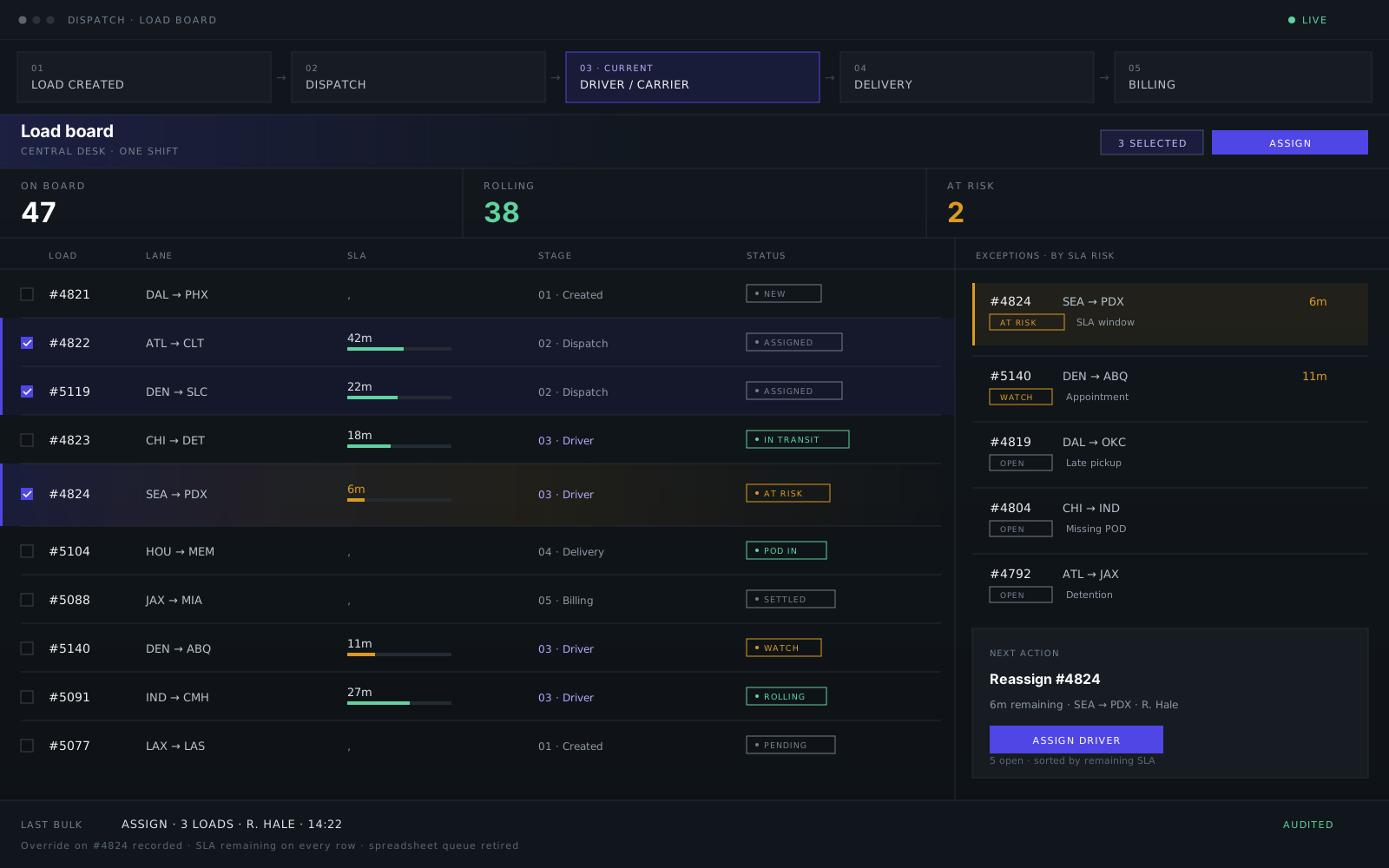
When volume crosses a few hundred daily routes, per-row assignment becomes the bottleneck. Select the loads, pick the driver or lane owner, confirm once. The supervisor gets one audit trail, not forty silent edits spread across a sheet tab. If your TMS cannot batch reassignment with a reason code, the desk will keep doing it elsewhere.
The action itself is four steps: select, validate permissions and conflicts, apply once, write who / when / which loads to the audit log. One click that updates the load record, the owner queue, and the schedule board is the point. Five separate updates is how the sheet survives.
- #4822ATL → CLTOn
- #4824LAX → LASOn
- #4826DEN → SLCOn
- #4821DAL → PHX42m
- #4825SEA → PDX51m
Put SLA on the row, not in a separate dashboard
Exception dashboards that live three clicks away get checked once an hour. SLA remaining belongs on every load row, color-weighted, sorted by urgency. Dispatchers should answer “what breaks in the next fifteen minutes?” from the board they already have open, not from a chart they have to hunt for. When we rebuilt ShiftRail’s console for a 400-route US desk, moving burndown onto the row cut average exception response to eleven minutes.
- #4826DEN → SLC4m
- #4823CHI → DET6m
- #4822ATL → CLT9m
- #4824LAX → LAS18m
Match density to the role, not the demo screen
A dispatcher scanning 120 rows needs compact type, sticky headers, and keyboard-friendly multi-select. A field supervisor on a tablet needs thumb-sized actions and fewer rows per screen. An executive summary can be sparse. One layout for every persona means someone is squinting or scrolling. Shadow three shifts before you pick column density: the person doing bulk work at 6am is not the person signing off overrides at 2pm.
Driver communication follows the same rule. Status, acceptance, and POD have to write back to the load row. A driver app that cannot do that leaves dispatch on the phone - the same failure as a board that cannot bulk-assign.
- #4826DEN → SLC4m
- #4822ATL → CLT9m
- #4821DAL → PHX42m
Roll out in phases the floor can absorb
Do not swap TMS, spreadsheet, and CRM on the same Monday. Week one: dispatch board with read-only TMS sync. Week two: bulk assignment and SLA on the row. Week three: exception queue and supervisor overrides with audit. Integrations and analytics after daily usage proves out. Measure handle time per load and exception response from day one, not after a quarter of parallel running.
How a dispatch CRM improves dispatch operations
The mechanism is fewer clicks per assign, exceptions visible without leaving the board, and one audit trail at shift change. On ShiftRail, that showed up as signed-off outcomes: −32% manual handle time, eleven-minute average exception response, and 99.4% console uptime after launch. Those numbers are project results, not a promise that every desk will match them.
What transfers is the shape of the work. Bulk assignment removes the forty-click tax. Row-level SLA stops the “customer called first” exception. Role density keeps the 6am board usable. Phased rollout keeps the sheet as a fallback until the console earns the shift. Finance benefits only after POD and detention live on the same record - otherwise settlement stays a third spreadsheet.
What to consider when choosing or building one
Map the spreadsheet first. Document the queue, the SLA logic, and the handoffs the sheet actually controls. Then decide whether to configure the TMS, extend it with a console, or rebuild a module. That order is the same delivery process we use on trucking desks: shadow, friction, design with the floor, build beside the stack, then cut over behind flags.
- Keep the TMS as source of record unless its architecture is the constraint.
- Shadow at least three shifts before locking column density or bulk-action rules.
- Measure handle time per load and exception response from day one.
- Ship the board before analytics. Integrations after daily usage proves out.
- Test against real dispatch shapes on sanitized staging data, not demo lanes.
- Confirm who owns the code, designs, and documentation after launch.
On ShiftRail the console was Next.js, React, and TypeScript, with integration tests against TMS schema versions. The stack we use follows the desk, not the other way around. If you are comparing a boxed TMS overlay with a custom console, the useful question is still: what does dispatch rely on today that the vendor screen cannot do?
Key takeaways
- A trucking dispatch CRM is the shift console: assignment, SLA, driver updates, audit. The TMS stays the system of record.
- It is needed when the spreadsheet is the real queue - not when the TMS already does bulk work, row-level SLA, and role density well.
- Four patterns decide adoption: bulk assignment as one event, SLA on the row, density matched to the role, and a phased rollout the floor can absorb.
- Outcomes come from fewer clicks and earlier exceptions, not from replacing every system on a Monday.
If the sheet still runs the shift, the next step is not a vendor bake-off. Show us the workflow dispatch actually uses - the board, the tab, the handoff - and we will say whether it should be configured, extended, or rebuilt. KRIVA is a product, UI/UX, and engineering studio that builds these consoles for US trucking desks. Book a free 20-min fit call or send a project brief.